The whole draft, on the Live tab.
Win odds at your rank and what moves them, every lane head to head, the duos that do better together, and a scouting card for every player: rank, form, main role and their games on that champion.


In game
Small panels drawn over League from the game’s own live data, one transparent window that never takes your keyboard. Nothing is injected, and nothing reads the game’s memory.

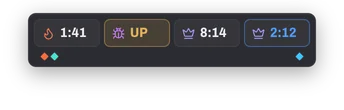
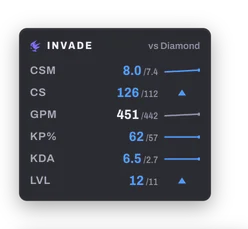
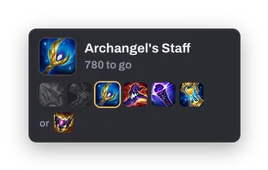
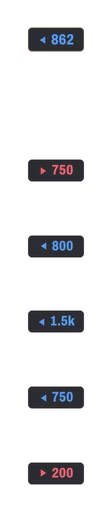
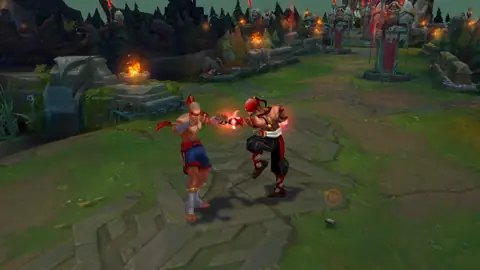
A real game, Invade’s panels at their default places.
Timers, at a glance. Dragon, grubs, herald and Baron as small pills, with the dragons each team holds.
Your pace, live. CS, gold, KDA and kill participation against a target rank, with a trend over the game.
What to buy next. The next item of your build, and the gold it still takes once your components are counted.
TabHold Tab for lane gold. Each lane’s gold lead on a small plate, down the middle of the game’s scoreboard.
Champ select
Hover a champion and the best rune page goes straight into the League client. Draft odds and the best counters sit beside it, about a second after champ select opens.
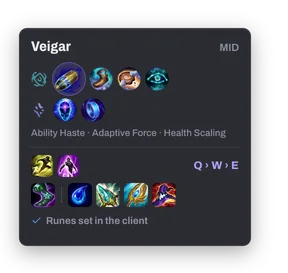
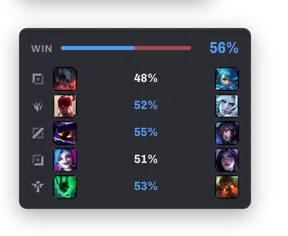
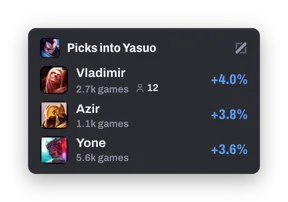
Win odds at your rank and what moves them, every lane head to head, the duos that do better together, and a scouting card for every player: rank, form, main role and their games on that champion.
After the game
Each of the ten players gets an Invade score, measured against the Emerald pace of their role and against the lobby: KDA, kill participation, damage, gold, CS, vision, objectives. You see where you placed, and why.


Home averages your last twenty scores and sets them against the rank above yours. The arc runs from red to blue, so a good week shows at a glance, and turns gold from 80: a game you will remember.
The best player of the winning team.
Third of the ten players.
The best of the losing team.
Recording
Invade records your games in the background and keeps your kills, deaths, assists and objectives as short clips. A triple kill is one clip, not three.

In game, the highlight key saves the last thirty seconds as a clip. Screen recordings start and stop from a key of their own.
Record all PC sound adds Discord, music and every other app, with a volume of its own. It stays off until you turn it on.


A tier list for every role and rank. Win, pick and ban rates, grouped by tier. A row opens the champion’s page.

Every matchup, laid out. The champions a pick beats and the ones it fears, lane by lane.

The game, live. Both teams with items, gold and the win estimate, once a second.

Star it, find it later. Champions, builds, rune pages, matchups, games and clips, in one place.

One field for everything. Press ⌘K or Ctrl K for players, champions and pages, even with League closed.

In twelve languages. It follows the League client’s language, and you can pick another.

Synced with invade.lol. Each game you finish reaches your web profile the moment it ends.
Performance
The work happens in a small native core that waits quietly between games. Recording uses your graphics card’s encoder, and the overlay window only exists while you play.
Measured on macOS: League closed for the first figure, a two-minute recording for the memory figure.
The builds are not code-signed yet, so your system asks once. On Windows, keep the file if your browser asks, then choose More info and Run anyway. On macOS, open Invade once, then choose Open Anyway in System Settings, Privacy & Security.
Yes. There is no account and no subscription: Invade reads your profile from the League client on this computer, so there is nothing to sign up for.
Invade only uses the two APIs Riot’s own software serves on your computer: the League client’s and the game’s Live Client Data API. It never reads the game’s memory and injects nothing into it. The overlay is a separate, transparent window drawn on top of the game.
Windows 10 or later (64-bit), and macOS 13 or later on Apple silicon and Intel Macs. Recording needs Windows 10 version 1903 or later, and the Screen Recording permission on macOS.
On your computer, one folder per game: Movies/Invade on macOS, Videos\Invade on Windows. When the storage limit is reached the oldest recordings go first; starred games and favorite clips are kept.
It needs Borderless or Windowed mode, as no window can draw over exclusive fullscreen. When champ select starts, Invade switches a Fullscreen setting to Borderless through the League client, before the game opens.
Your finished games go to invade.lol, so your profile there is up to date, along with the rank, level and mastery of the players the League client shows you, so their profiles stay current too. Settings shows what was sent, and invade.lol/privacy lists all of it. Besides that, one anonymous ping when the app starts and one per update, which you can switch off in Settings.
The builds are not code-signed yet, so your system asks once. On Windows, your browser may say the file isn’t commonly downloaded: choose Keep. If Windows then says it protected your PC, choose More info, then Run anyway. On macOS, drag Invade to Applications and open it. When macOS stops it, open System Settings, Privacy & Security, and choose Open Anyway.
Invade checks for a new version in the background, never during a game, and installs it when you click Update. Every package is checked against Invade’s signature first.
Invade isn’t endorsed by Riot Games and doesn’t reflect the views or opinions of Riot Games or anyone officially involved in producing or managing Riot Games properties. Riot Games, League of Legends and all associated properties are trademarks or registered trademarks of Riot Games, Inc.