What’s new

Invade for desktop

0.3.4

Your own builds

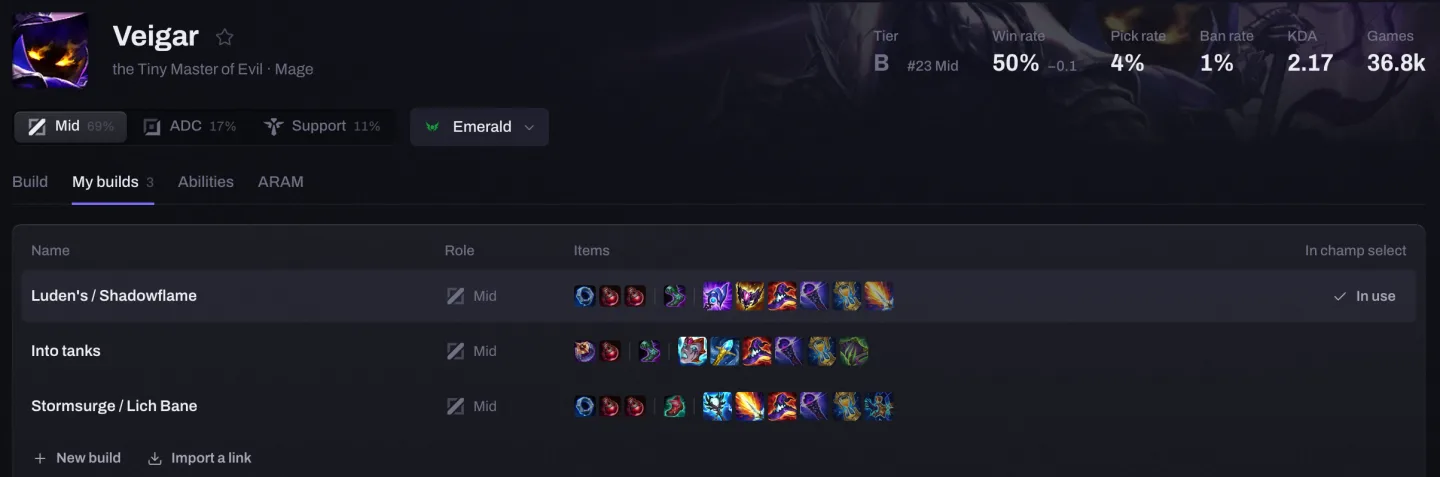
On a champion's My builds tab, start from Invade's build, swap the items, give it any name (a new one is named after its first two core items) and keep as many as you like per role, each on one row of the table with its whole route. Champ select and the in-game Build path follow the one you choose, and a short invade.lol link shares it, with the build shown on the page and in the Discord preview, or imports a friend's.

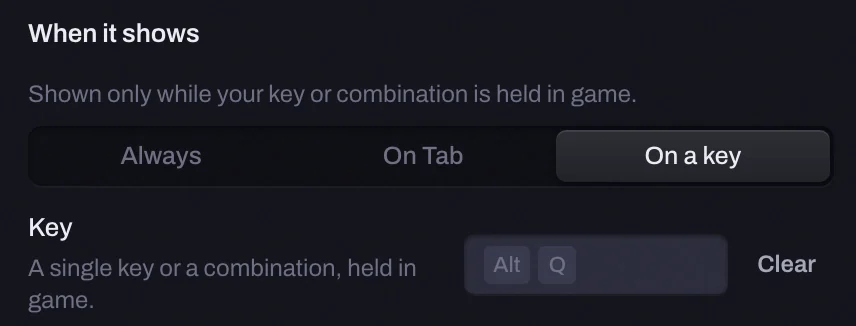
Choose when each overlay shows

Always, only while Tab is held, or only while a key or combination you pick is held in game. No key is set for you. Overlays → an overlay → When it shows.
Next skill

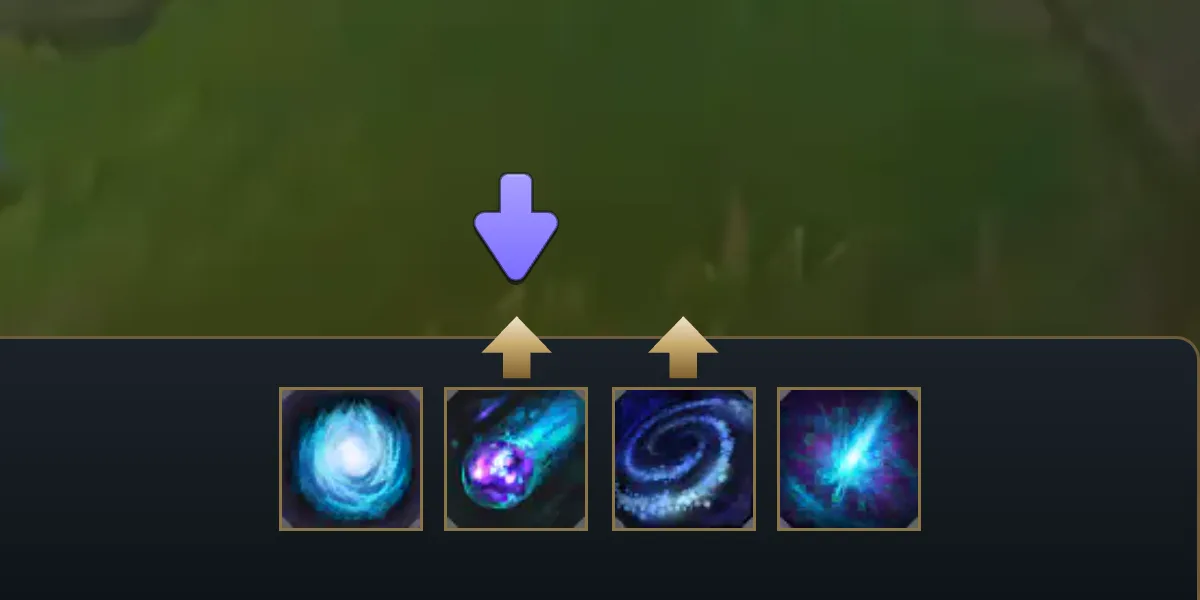
When a skill point is waiting, one arrow points down at the ability your build levels next, right on League's own ability bar, at any resolution and HUD size. It goes away once the point is spent. A suggestion: level what you like.
Previous patch

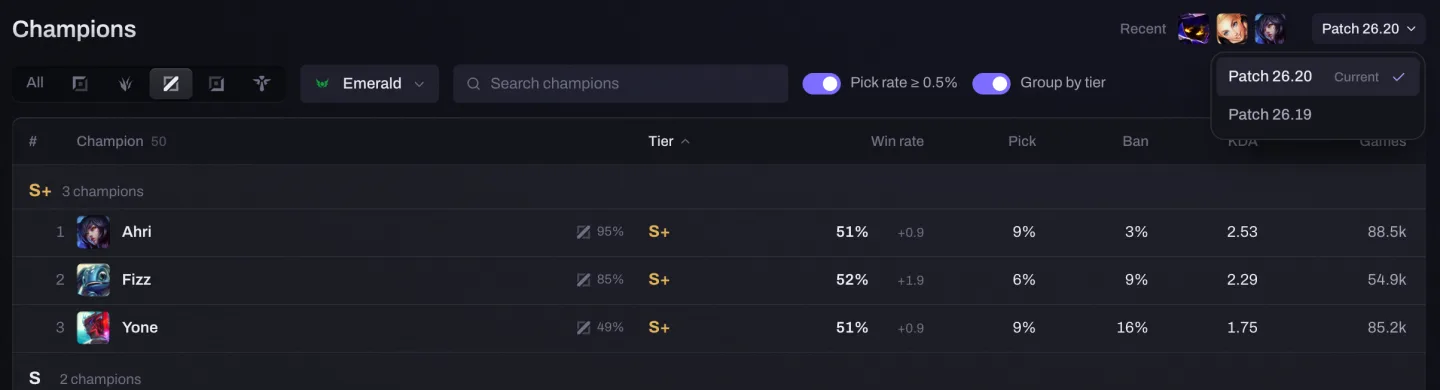
The tier list, champion pages and Matchups can switch to last patch's data (26.19) from the patch label. A champion's build on 26.19 is the one most played on that patch. Champ select, ARAM and My builds stay on the current patch.
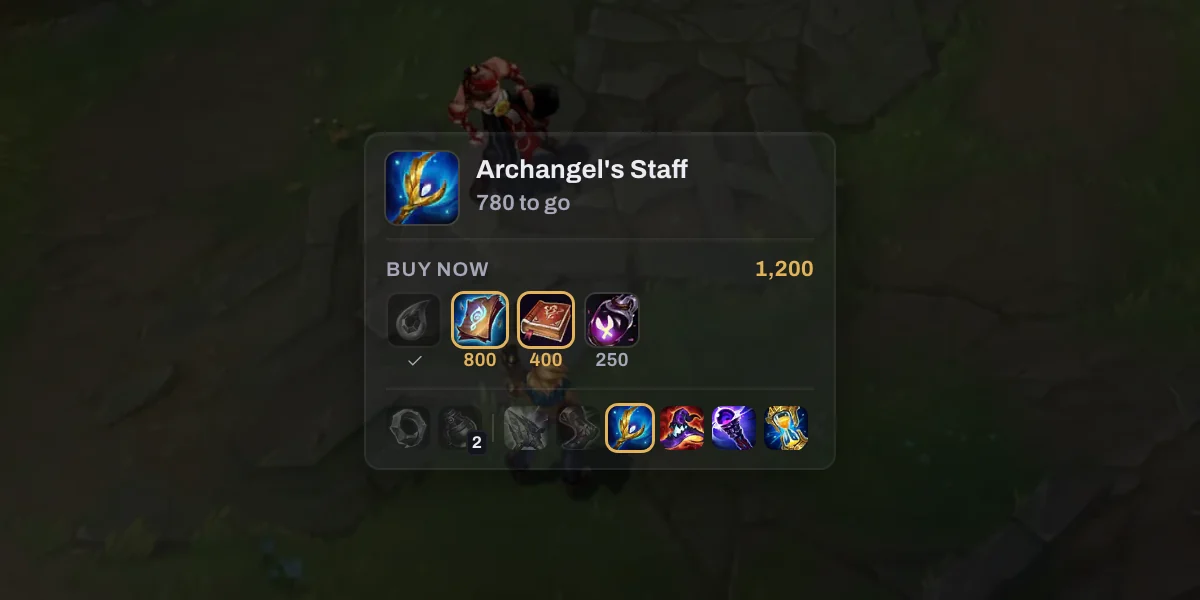
The whole build path in game

The Build path overlay (was Next item) starts with your starting items, then shows the next item with its components: what you own, what your gold buys now, then the rest, and the route to your sixth item. Components and boots come in the order players really buy them in ranked.
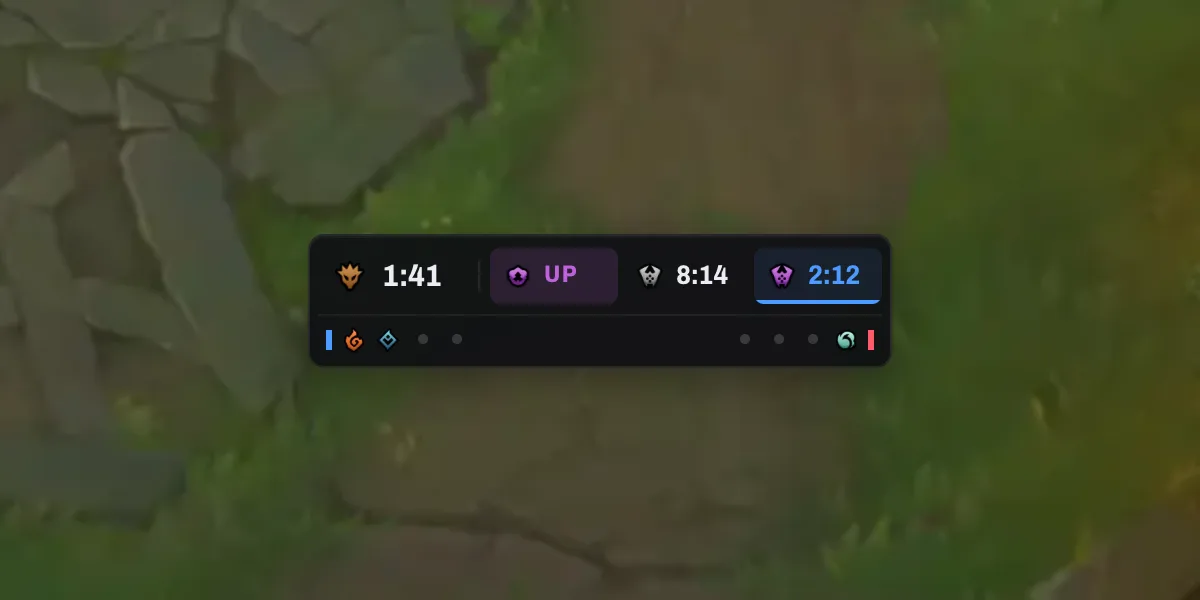
Objectives with the game's own icons

The next dragon shows its element once the Rift has changed (the plain dragon head before), Void Grubs, Herald and Baron wait in grey until they matter, and the soul race shows the dragons each team took.
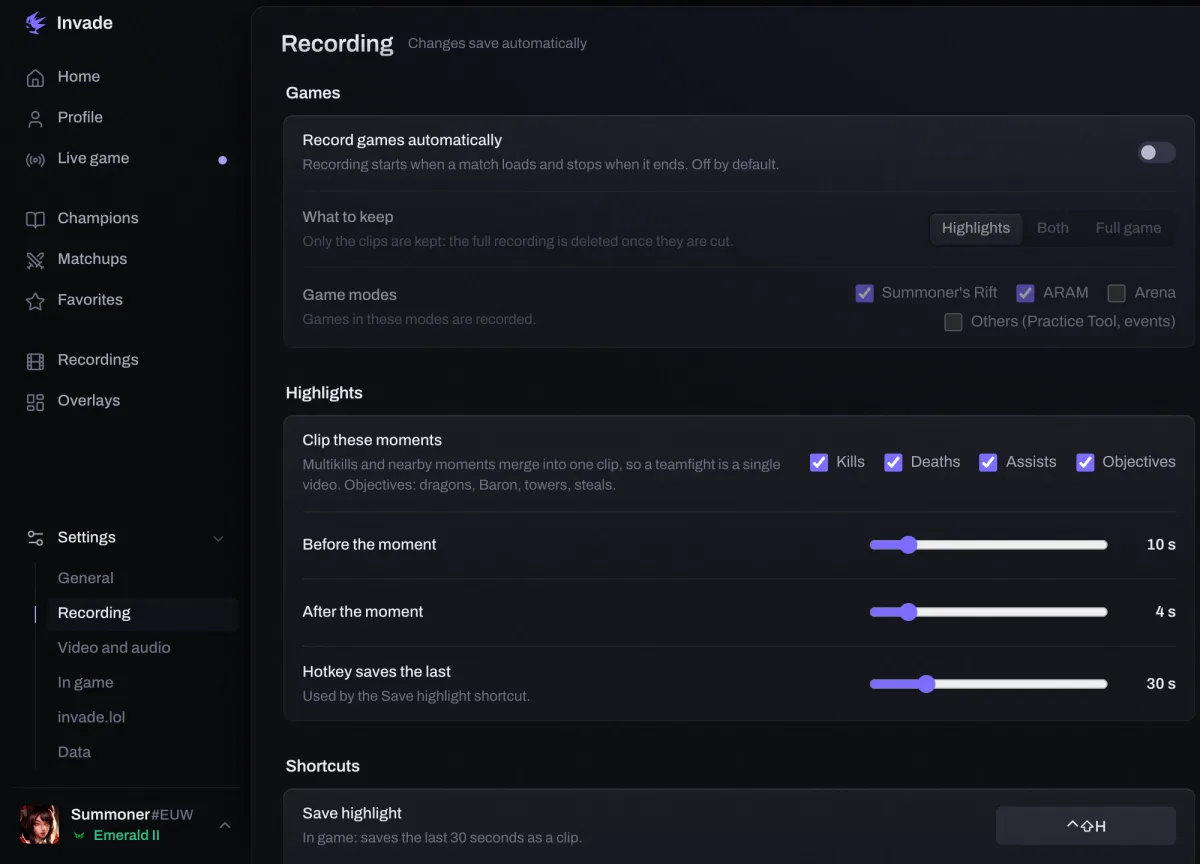
Settings, one page per category

Click Settings in the sidebar and its categories open under it: General, Recording, Video and audio, In game, invade.lol and Data. The search bar finds any setting.
A lighter start of champ select, on Mac above all

The overlay gets ready while you queue instead of the moment champ select opens, your runes and spells go into League before Invade looks up the other players, and those lookups go a few at a time so League stays smooth.

Match history no longer gets stuck on two games

Invade now asks League for a full page instead of a two-game preview that the client could keep serving from its cache. Previously archived games stay available when League returns a shorter list.

New

  • Fold an overlay to its title. The minus on a panel's title folds it to a slim bar; click the bar to open it again. It stays folded for your next games.
  • Your build path in the match detail. Every purchase with its time, with sold items apart, and the role quest reward (where a bot laner's boots end up) as a seventh item.
  • Discord, from the lobby to the result. In the client, friends see your main champion and rank; in champ select, the phase and, once you lock in, your own pick and role. Nothing about the other players.
  • Clips carry a small Invade mark in the corner.

Changed

  • Scoreboard gold follows the scoreboard. Drag the Tab scoreboard or swap its rows, and the gold plates move with it.
  • Lane gold compares what each player holds. Every figure is the shop value of both players' items, the same as the Live tab's.
  • Invade speaks your computer's language, not League's: if you play League in another language for its voices, Invade stays in yours. Settings → Language.
  • The window opens on every launch, at login and during a game too, and opening Invade again brings it forward.
  • Calmer empty pages. Live game with no game, and Recordings with none yet, now show one line and at most one button.
  • Updates show as one slim line in the sidebar, its bottom edge filling while it downloads.

Fixed

  • Stronger protection for saved history. Incomplete client responses keep each saved game's owner, and database recovery preserves earlier backups and the write journals. Copy diagnostics now includes the database's availability and game counts.
  • Champ select is read to the end. A session with odd values could go unread from the bans until the game started. Invade now keeps reading it, waits up to 5 seconds on a slow PC, never takes another player's pick for yours, and no longer needs a restart when it lost track of the last game.
  • Recording shortcuts can be changed on a Mac. The shortcut field now takes the keys you press, shortcuts show as ⌃⌥⇧⌘, and the overlay says why a shortcut pressed in game did nothing: game recording is off, or the game is already being recorded.
  • The overlay no longer acts like a web page over the game. A right click on it opens no menu, and Ctrl+P no longer opens the print dialog over the game.
  • Overlays come back after Alt+Tab. When you return to the game, Invade puts them back on top, and hiding them from the tray during a game no longer loses them.
  • Your name on the welcome screen no longer goes blank when League answers before it knows it.
  • The LP of the game you just played is never put on the previous one.
  • Ranked games are never shown as custom games when League leaves out the queue.
  • Invade no longer freezes when the tray is clicked as a game starts or ends.
  • Discord no longer says you're in the client while League is closed.
  • A recording keeps going if the clip mark can't be drawn, without the mark.
  • A player hidden in champ select stays hidden, even when the client sends an odd value.
  • Crashes fixed: the Abilities tab of a champion without tips, and deleting a recording on Windows.
0.3.3

Choose what Tab does to the overlays

Holding Tab can hide them as before, keep them on screen, or show them only while you hold it. Overlays → All overlays.

Runes and build follow your role from champ select

Smite counts as jungle when the game gives no role, and a role swap brings the right page. If your champion is almost never played in that role, Invade shows no build rather than another role's.

Mac: the overlay now shows over League in Borderless

Invade looked for the game window under the wrong name, so the overlay stayed hidden behind the game; it now sits on top and you can move its panels.

New

  • Turn off the automatic rune import. A new switch in Settings → Champ select: off, Invade puts nothing in the client by itself, and the Import button on the Live tab still does it when you ask.
  • Bigger overlays. Each panel goes up to 250% for 4K and ultrawide screens, and always stays on screen.

Changed

  • ARAM: Mayhem augments, one rarity at a time. Tabs switch between silver, gold and prismatic, with up to 12 augments each and how often players pick them.
  • A dot on the (i) after an update, until you open the release notes.

Fixed

  • Mac: the Tab permission button works. When macOS won't show its prompt, it opens Input Monitoring in System Settings.
  • Mac: screen recording no longer says the permission is missing once you've allowed it. If macOS needs Invade restarted for it, a Restart Invade button does it.
  • The window opens on one screen. With two or three monitors, Invade opens centred on one screen and fully inside it, and the video player fits a small window.
  • Recordings stop before your disk is full. Invade keeps space free for League and your system, and saves the recording it stops.

0.3.2

Your game, live on your Discord profile

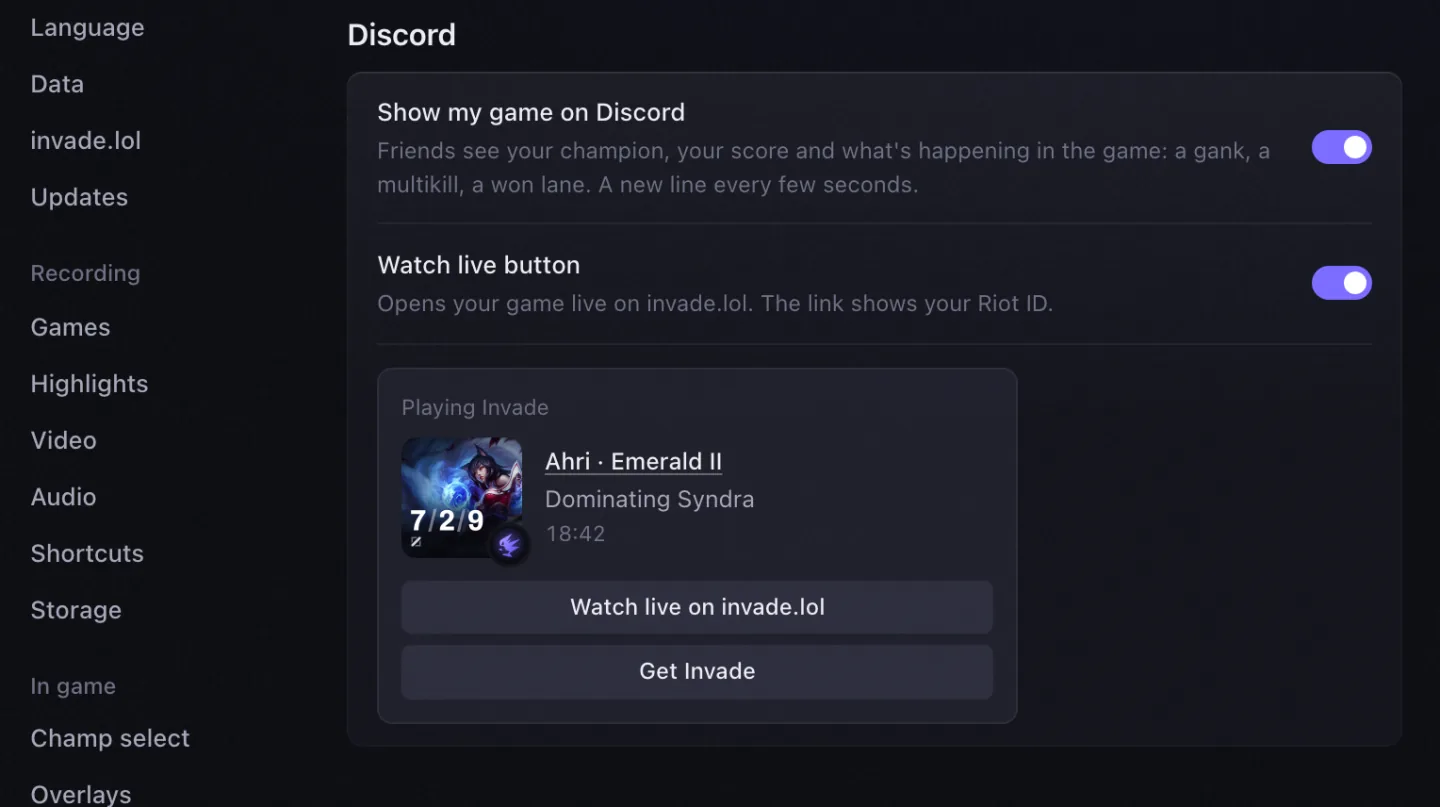
While you play, friends see your champion, rank and score on a card drawn by invade.lol, with a line that follows the game: a gank, a multikill, a stolen Baron, your CS. A button opens the game live on invade.lol, and the result stays up for three minutes after the game. Settings → Discord turns it off, or hides the live button.

Most picked augments in ARAM: Mayhem

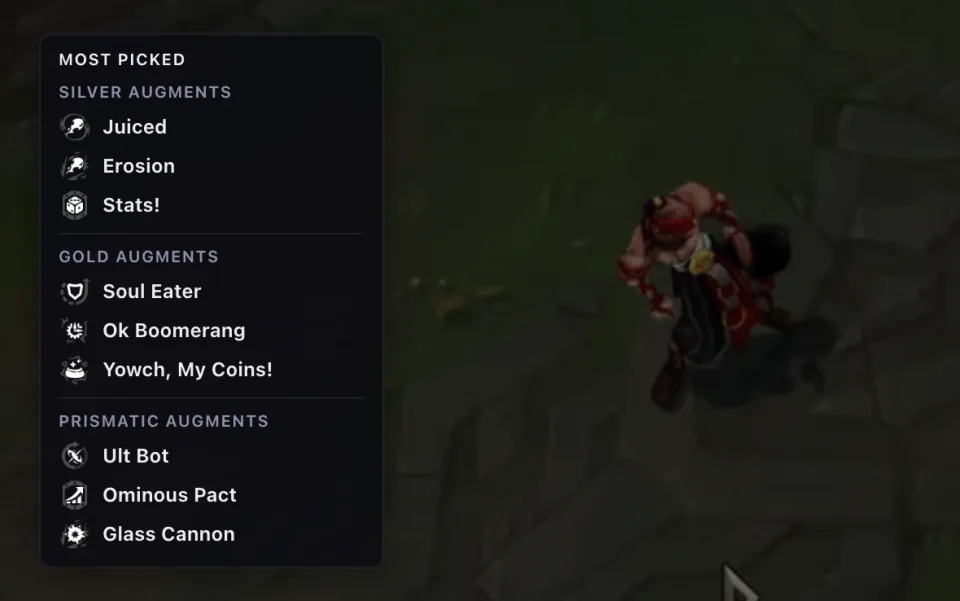
When you can choose an augment (at the start, while dead, just after you respawn), a small panel lists the augments players pick most on your champion, by rarity, in your language.

Scoreboard gold is right

It counts what your items really cost, so finishing an item no longer makes a lane look behind and starting items never show as a lead. Each figure stays on its player however often you open the scoreboard. Gold per minute and the Live tab's team gold count the same way.

Overlays you switch off stay off after a restart

Invade now saves your overlay choices, panel positions and the tray's Show / hide the moment you change them, so a shutdown, a crash or an update can no longer turn every overlay back on.

New

  • Invade starts when you log in. It waits in the tray, ready for your first game, and opening it yourself still shows the window. Settings → Startup turns it off, and updates keep your choice.
  • Anonymous crash reports. When Invade crashes, it reports the version, your system and the first line of the error, with names, Riot IDs and folders removed, so the crash gets fixed without you having to report it. Settings → Data turns it off; until you change it, it follows your usage statistics choice.
  • What's new has its own page. The (i) at the top right now opens the notes of every version, with pictures. The window after an update leads there too, and Settings no longer has a Changelog.

Changed

  • Move a panel by its header. Grab the whole top of a panel, Invade logo included, and it follows from the first click. A cursor just passing over a panel still leaves your clicks to the game.
  • The overlay follows the game mode. Outside Summoner's Rift (ARAM, ARAM: Mayhem, Arena and other modes), it no longer shows Rift objectives, lane gold, rank targets or builds, and champ select no longer imports a Rift rune page. Both ARAM modes keep the team gold lead on the scoreboard. The Live tab no longer suggests Rift builds, lane picks or draft odds in those champ selects either.
  • Builds, tiers and matchups are on patch 26.20, and patches go by their 2026 names, as in the game client and Riot's patch notes.
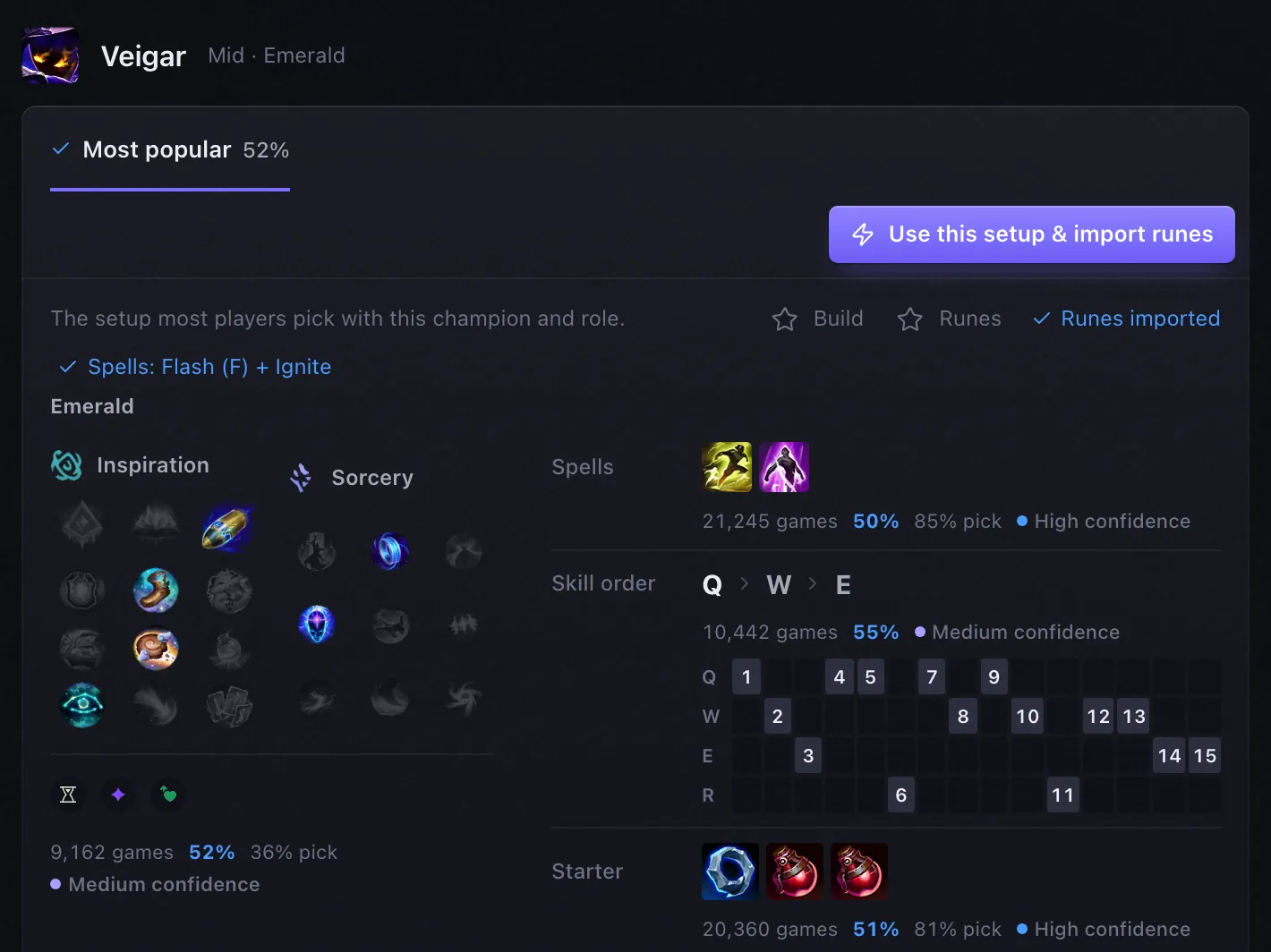
  • Build rows only say how many games they rest on. The win rate, pick rate and confidence next to spells, skill order, starting items and the other rows are gone.

Fixed

  • Runes you change yourself in champ select stay yours. Invade no longer writes its page over yours, even when you open or click the app. Its import button still puts its page in when you ask.
  • Deleting a whole game works on Windows again. It failed with "Could not move to the Recycle Bin, Code 124". If the Recycle Bin or Trash can't take a recording, Invade says why and what to do, and never deletes it for good. A game still recording or saving can't be deleted.
  • Home: the rank tile no longer writes over today's games in a small window, in any language.
  • Mac: the overlay shows over League in Borderless. Clips record the game's window there instead of the whole screen, and moving a panel no longer takes the focus away from the game.

0.3.1

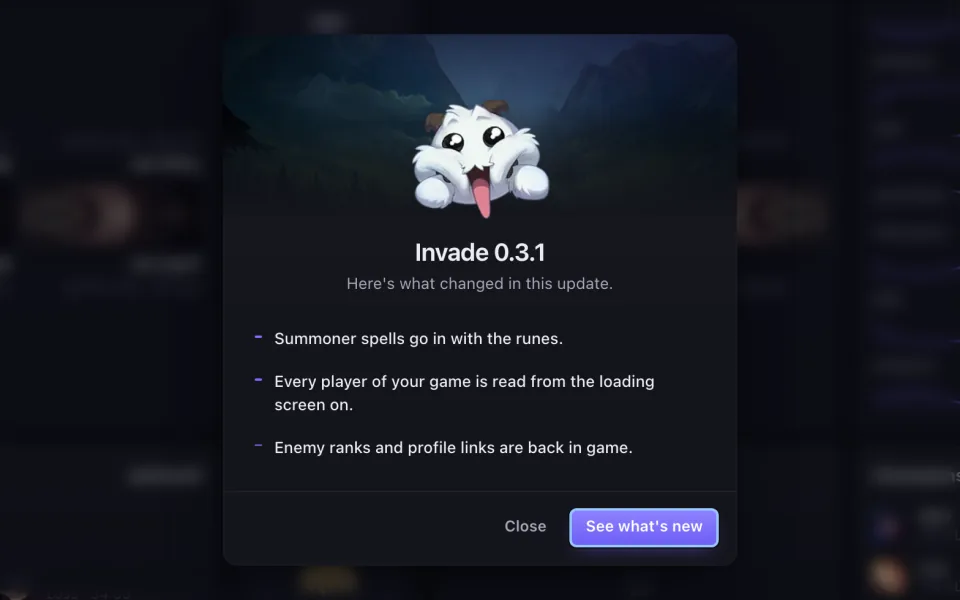
Summoner spells go in with the runes

When Invade puts your rune page in the client, the build's two summoner spells go in too. Flash stays on your key (D or F), junglers keep Smite, and a spell you change yourself is left alone for the rest of the champ select. Settings → Champ select turns it off.

What's new, after each update

A small window tells you what changed the first time you open Invade after an update, and the (i) at the top right keeps every version.

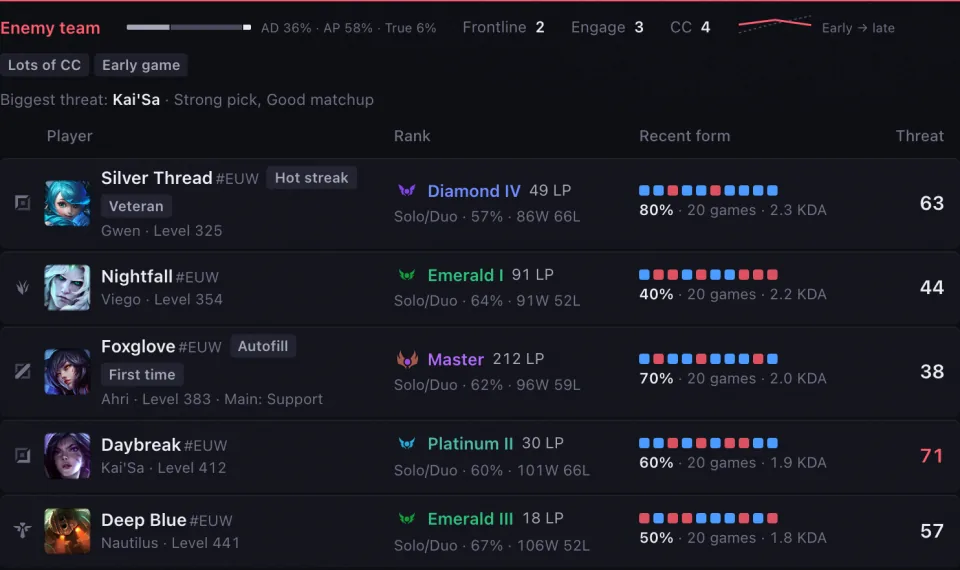
Every player of your game is read from the loading screen on

As soon as the client names the ten players, Invade reads each one's rank and champion mastery, then their recent games, and sends them to invade.lol as it reads them, during the game, so every profile you meet is complete there. The game you just played still goes first, the moment it ends. Settings → invade.lol says what is sent.

Enemy ranks and profile links are back in game

0.3.0 took every player the client lists without a name for a hidden one; only a player the game itself hides stays anonymous now.

New

  • Images ship with the app. Champions, items, runes, spells, abilities and rank emblems are packed in Invade, so they show at once, even offline; invade.lol only fills in what came out after the release.

Changed

  • Update from the sidebar, even during a game. The update sits at the bottom left again, with its progress. It installs mid-game too: the game is not touched, the overlay is back a few seconds later, and a clip being recorded is kept.
  • One Invade at a time. Opening Invade again brings the running window forward instead of starting a second copy.
  • The tray's Show / hide overlay is remembered across launches.
  • Safer release builds: each window may only do what it needs, a stricter content policy, and diagnostics that show ~ instead of your home folder.

Fixed

  • Windows: Invade closed itself about 3 seconds after launch on a PC started less than 6 hours before.
  • Windows: Show in folder and Open in player opened the wrong folder.
  • A damaged recording no longer crashes or freezes the app, at launch or on the Recordings page.
  • The overlay no longer freezes when the game's live data has an empty field.
  • Scouting no longer takes a champion hovered for a ban for the ally's locked pick.
  • Your own rune page named "Invade…" is never overwritten or deleted.
  • And about 25 smaller fixes found by a new, much deeper test suite.

0.3.0

A real Invade score, and a harder one

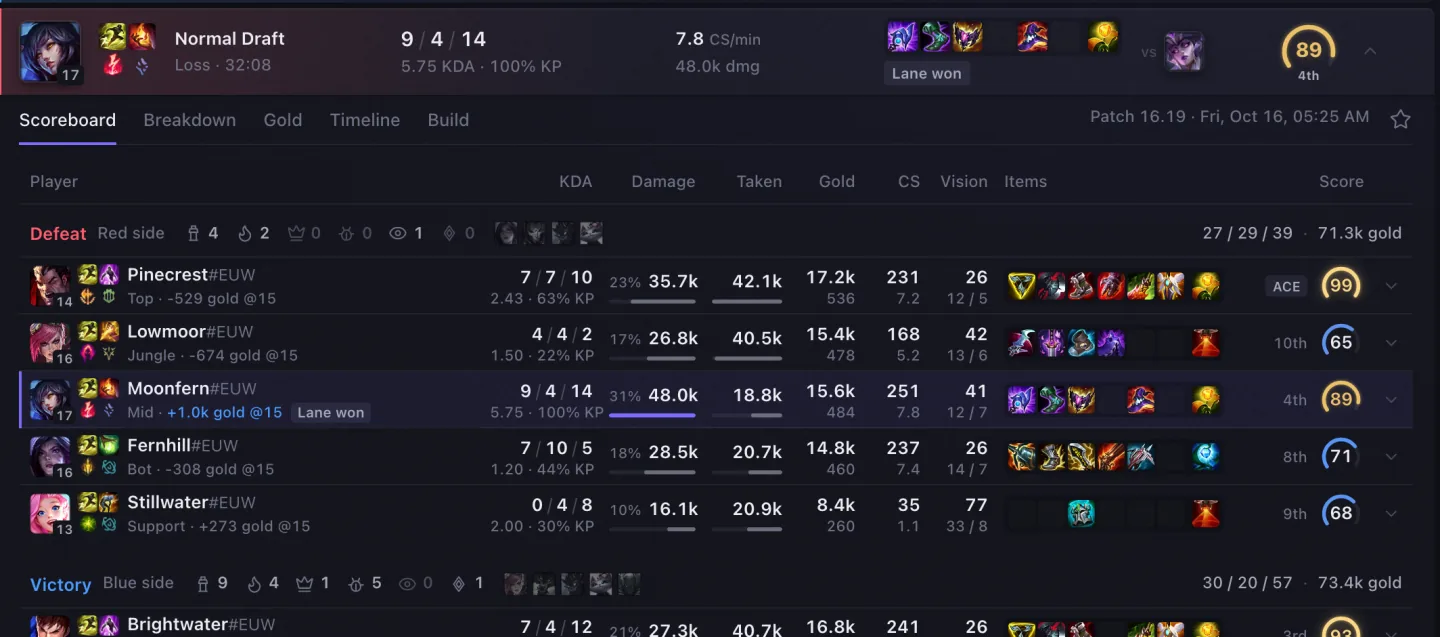
Each game is now measured against the Emerald pace of your role (CS, gold, kill participation, vision, KDA) as well as against your lobby, so your average reflects your level instead of sitting near 50. An average Emerald game is about 41, 80 is roughly one game in 25, 90 a few in a thousand, and 100 takes a game of the year. Scores below 80 spread wider, so a good game and a rough one no longer look alike. The app and invade.lol give the same score for the same game.

New

  • Discord, X and Report a bug at the top right of the window: join the community, follow Invade, or tell us what broke, in one click.
  • Riot's legal notice at the bottom of Settings.

Changed

  • 80 and 90 glow gold on the score dial.
  • AFK players are not scored and no longer count when the rest of the lobby is rated.
  • No flash when you change a filter. Home's queue, the profile's feed, Champions (rank and role), a champion's build and Matchups keep what they show until the new data has arrived, then swap in one go: no empty frame, no skeleton, no crest fading out and back, no dials redrawing. A slow answer dims the page slightly; a fast one shows nothing.
  • A champion's page changes role or rank in one go: figures, build and matchups swap together, never one role on top and another below.
  • ARAM augments show their popularity only. Riot's developer rules do not allow augment win rates, so their tier and performance are gone.
  • Brawl and League Classic games stay off invade.lol and out of your stats. Riot has not approved Brawl data and asks that League Classic data not be shown, so these games are no longer uploaded, listed, counted or scored.
  • Players who hide their name are never identified. In champ select and in game, a player the client marks as hidden (ranked lobbies, streamer mode's Hide My Name) is never looked up, shown or sent to invade.lol.

0.2.9

Home is one calm screen of tiles that never scrolls

Rank, a larger performance column (score, CS, KP, vision, KDA, gold per minute), match history with scores, clips, favorites and champions.

New

  • Counters overlay in champ select: once your lane opponent is known, the three best picks into them. The same counter engine drives the Matchups page and the Live tab.
  • League closed, data still there: match details, scores, Played with and any player you click open from invade.lol when the League client cannot answer.
  • Favorite games and clips. Star a game or a clip; favorite clips are never removed by the storage limit.
  • Record all PC sound (Settings → Recordings): Discord, music and other apps in your clips, with their own volume. Off by default.
  • Search players from invade.lol: the search bar (⌘K) suggests players as you type, even with League closed.
  • Infinite match history: older games load as you scroll.
  • Player detail in a match: click a scoreboard row to see that player's build, score breakdown and lane matchup.
  • Copy diagnostics and Open logs folder (Settings → Updates), to send us what went wrong when runes or overlays do not work.

Improved

  • Profile: balanced at every window width; a calmer LP history chart; full rank emblems that never cover text.
  • Rune import: the button really imports and shows the client's answer; runes follow every change of pick; your existing rune pages are kept whenever possible.
  • Champ select overlays are on by default and appear within about a second.
  • League in a custom folder is found from the running client.
  • Scoreboard gold (Tab) sits down the middle of the scoreboard, on small plates.
  • invade.lol receives every game the app reads (your games, matches you open, profiles you view), compressed and only when it does not have them yet.
  • Champions: grouped by tier by default; the table head stays solid.
  • Window light: one soft violet light, no tier tint across the page.
  • Overlays page: shows an alert only when something needs fixing.
  • Matches and profiles are drawn by the same components as invade.lol.

Fixed

  • Runes imported only for the first champion, or for a champion being banned.
  • Clicking Use this setup & import runes said "Runes imported" without importing.
  • Match details and other players' profiles were empty with League closed.
  • Games that ended while Invade was closed never reached invade.lol.
  • Sorting the Champions table by a column turned Group by tier off for good.
  • Clip cards grew on hover and clips were squashed on small windows.
  • The recording dot was stretched.

Removed

  • The Win & gold overlay.
  • The "League is closed" notes on Home, the profile and the sidebar.